

This section describes how to initialize and configure External Feed Handler global settings.
Navigate to the tab of the MC component. To modify the parameters, uncheck the option and adjust the parameters as needed. It is possible to switch between default and custom settings without losing the specified values.
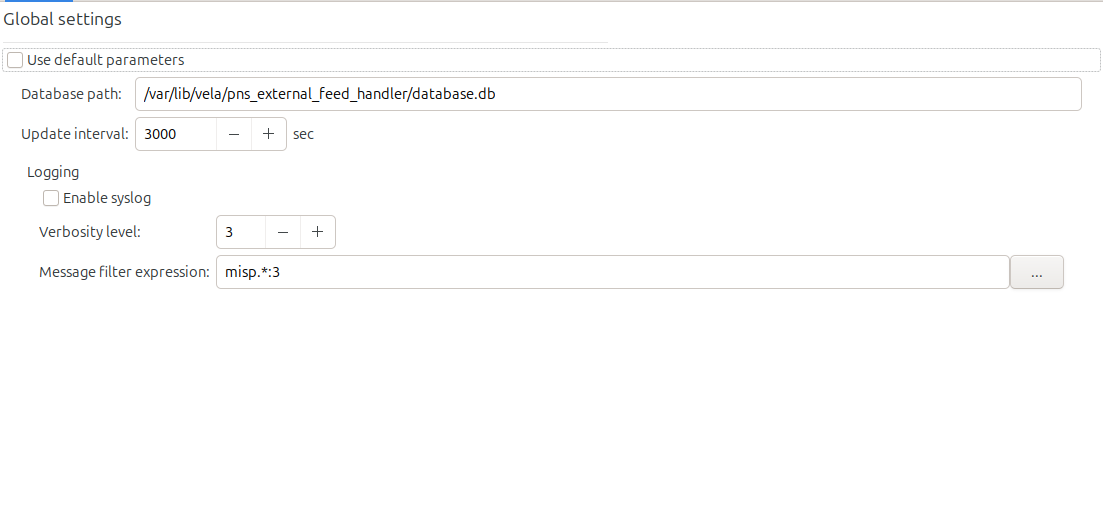
Database path: sqlite database file path where the downloaded datas are stored. For more information on owner and group, see Section 2.1.11, Linux groups used by components. Changing the path creates a new database, but the old one remains and is no longer updated.
Update interval: specific amount of time, measured in seconds, that elapses between checking for updates.
Logging: The Logging section has the following parameters:
Enable syslog: Tick it to log to syslog, otherwise the messages are logged to the standard output.
Verbosity level: It is the general verbosity of the instance. It ranges from 0 to 10; the higher value means more detailed logging.
Message filter expression: It contains a comma separated list of [class].[category]:[verbosity] where the class value can be *, core, daemon and misp; the category value can be *, info, debug, trace, error; and the verbosity ranges from 0 to 10. The last matching item will be used as the verbosity of the given tag. If no match is found the default verbosity is used.
Copyright: © 2021 Balasys IT Security
Send your comments to support@balasys.hu
